Introduction to Slides
Create editable Canvas Slides with AI, refine them visually in the Slides panel, reuse layouts, and export finished decks to PowerPoint.
What Slides Does
Slides turns a prompt, a reusable layout, or a Grid row into an editable presentation. You can ask AI to create slides from scratch, start with a blank page, insert a saved layout, or import a .pptx file so its slides become reusable layouts.
After slides exist, you can edit them directly in the Slides panel. Select objects, move and resize them, edit text inline, add charts and tables, update formatting, save useful pages as layouts, and export the final deck with Export to PPTX.
Core Concepts
| Term | Meaning |
|---|---|
| Canvas Slide | An editable slide built from objects such as text, images, charts, tables, shapes, and lines. |
| Slides panel | The editor where you create, review, edit, save, present, and export slides. |
| Layout | A reusable slide design that can be inserted into a deck or used by AI as a starting point. |
| Save as Layout | The action that saves the current slide as a reusable layout with a name, description, category, and visibility. |
| element ID | A unique identifier for a slide object. Use it when you need to tell AI exactly which object to change. |
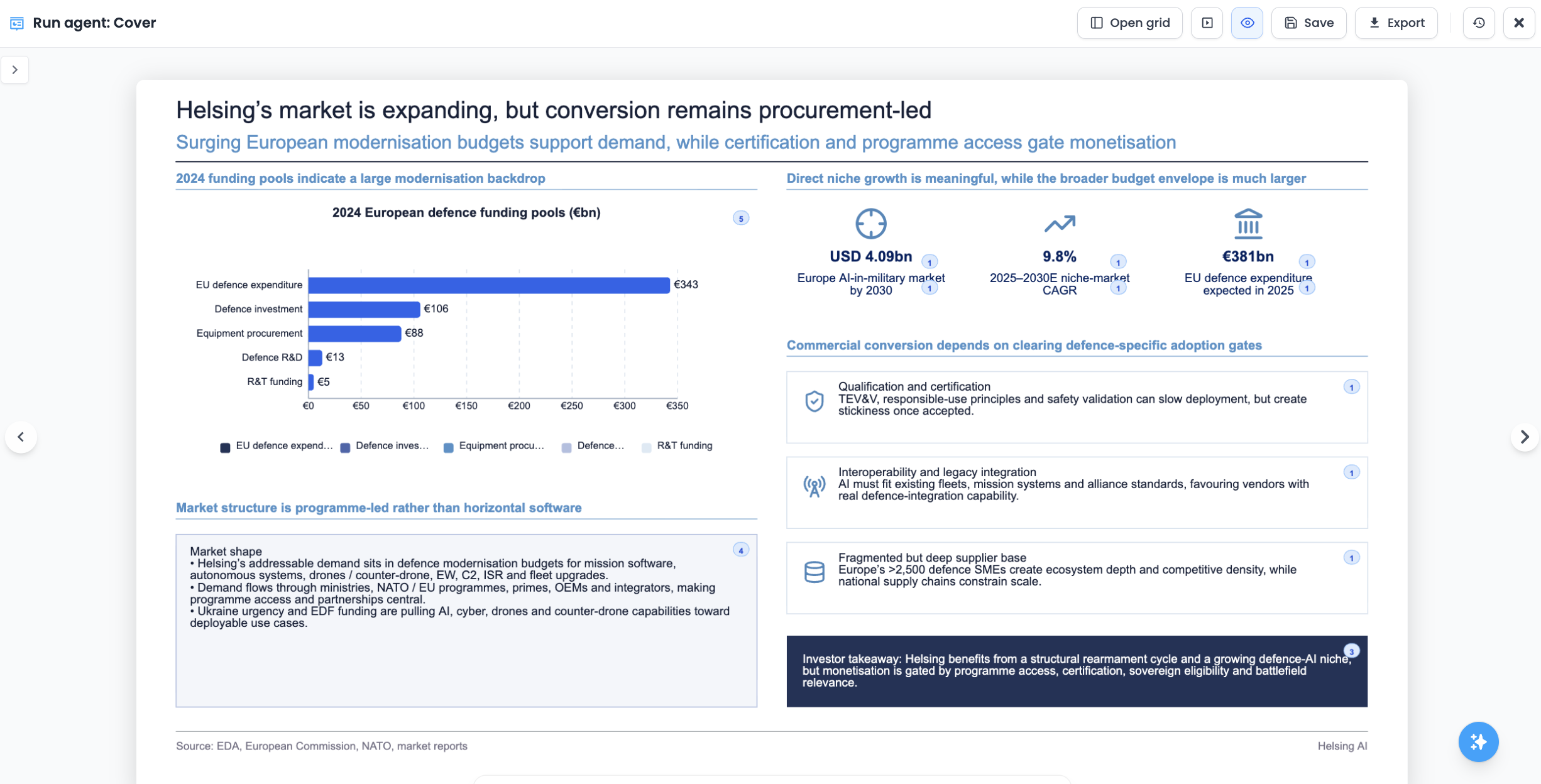
| citation badge | A small numbered review badge on a sourced slide object. Use it to inspect the document, web, or Grid cell source behind a claim or value. |
Main Workflows
Create From Scratch
Ask AI for a new slide or deck when the structure is open-ended. This works well for strategy summaries, investment memos, KPI slides, timelines, market maps, and other content where AI can choose the best structure.
Use a Layout
Choose Use layout when the output should match a known format. Layouts are useful for recurring report pages, one-pagers, board update sections, or any slide type you want to keep consistent.
Import a PowerPoint File
Import a .pptx file when you already have a useful presentation format. Lampi imports each slide as a reusable layout and can insert those slides into your current deck.
Work From Grid Rows
In Grids, a Canvas Slide column lets each row produce its own slide deck. This is useful for deal pipelines, portfolio updates, company one-pagers, customer reports, or any workflow where each row needs a tailored output.
Export to PowerPoint
Use Export to PPTX when the deck is ready to share or continue editing in PowerPoint, Google Slides, or Keynote.